 Pinterest is a great medium for getting your work, and especially your blog posts, out to a wider audience. Having just started blogging more regularly, myself, I’ve been pinning my recent posts to my Pinterest board. When I started to pin my own posts though, I noticed that the caption that Pinterest was giving my images wasn’t what I wanted. In fact, it was captioning my pins with the file name of the image that I posted in my blog post. Not pretty, and it means the if anyone else were to Pin my posts, they’d have to type in a prettier title. Let’s face it, how many people are actually going to do that? Clearly, I needed to figure out how to make my images Pinterest-friendly: So, how do you get pretty captions from your posts to show up on Pinterest?
Making Your Posts Pinterest-Friendly
You’ll be happy to know that it only takes one step to make this happen! When you’re uploading your images via the WordPress ‘Add Media’ button, you’ll see a little box that says ‘Title.’ In that box, you’ll see whatever you named your image when you saved it. (Pro tip: When naming the image files that are going to go up on your website, give them a human-friendly name, because human-friendly also means SEO-friendly. Also, when you name files for the web, try to use ONLY alphanumeric characters, hyphens and underscores. Naming your files that way makes computers happy, and happy computers mean that they won’t come to life and take over the world. Just kidding! Or am I? I digress.)
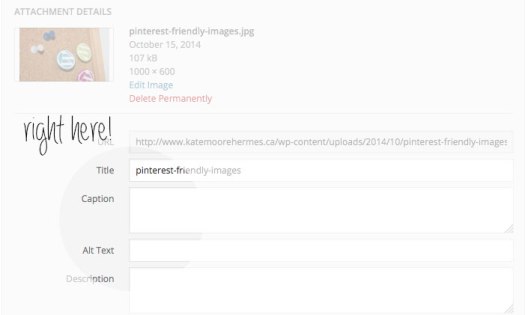
Once you’ve found that ‘Title’ box, put something Pinterest-friendly in there instead of the image’s file name. This is often where Pinterest pulls the caption that they put under your Pin, so write it in a succinct way, keeping in mind that this will also be good for your blog post’s overall SEO.
 It’s always a good idea to fill in the ‘Alt Text’ box, as well. These two attributes add descriptions to your images, which are great for SEO and also help out people who are visually-impaired. The visually-impaired often use software that reads to them, out loud, the text and descriptions of what is on a website. Pretty cool, and inclusive, huh? And we should do everything we can to make that process easier, amiright?
This method isn’t foolproof for getting your captions up on Pinterest, but it will help and is definitely a great practice going forward for the SEO of your site. Kind of win-win, I think!
One last thing: When Pinning your posts, make sure that you Pin from the actual blog post’s specific page, as opposed to Pinning from the blog feed page. This will ensure that when the Pin of your post goes viral, people will be directed back to your actual blog post, instead of the general blog page; that’s really where they want to end up. Happy Pinning!
P.S. If you want to follow my blog on Pinterest, you can follow me here. I also put my blog posts up on Facebook, Twitter and Instagram, natch.
 Kate Moore Hermes